
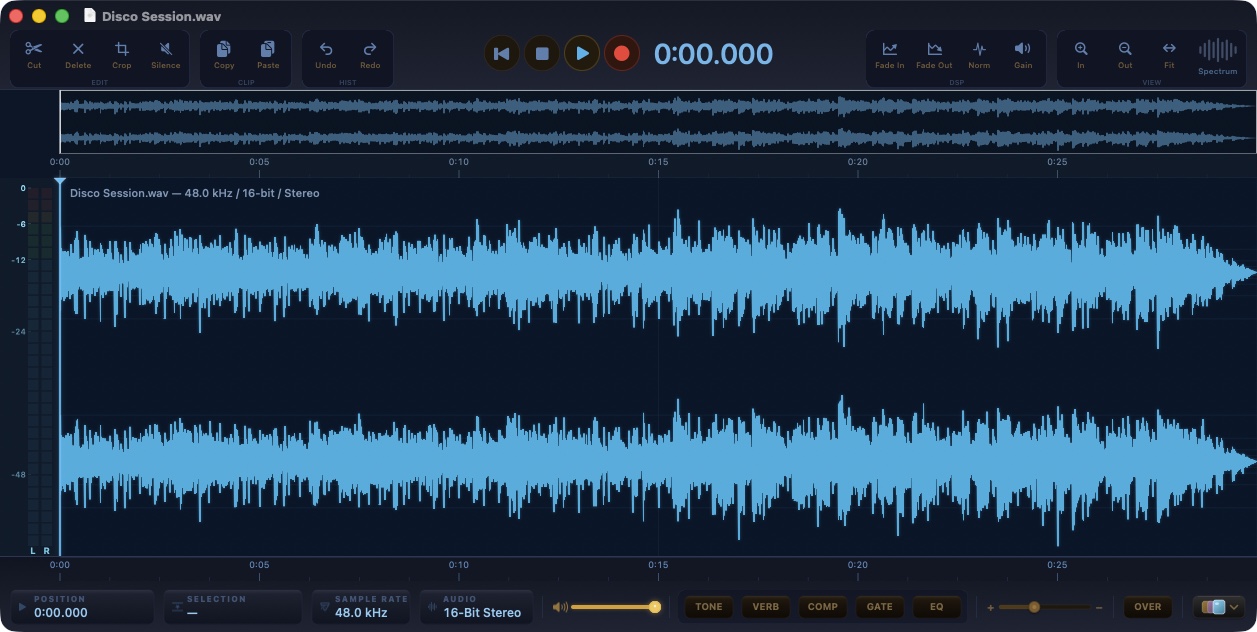
PeakLab 3.2: the waveform editor with a professional effects rack
Free, no account, nothing to sign up for. A focused audio editor for the Mac, now with an eight-band equalizer, a compressor, a gate and a reverb built in-house, every parameter in the open, and one processing path for what you hear and what you export.
01
The problem
There was a moment when editing audio felt direct: open the file, see the waveform, make the cut, render, done. PeakLab was born to bring that feeling back to the Mac, and its first versions did exactly that. They also stopped there. The effects were four preset buttons, the kind you press and hope for the best. A compressor with three settings and no knee. A gate that could not hold. A reverb borrowed from the system with a single mix control. For trimming a take it was enough; for finishing a voice, a podcast or a piece of music it was not.
The tools that do have proper dynamics and equalization are digital audio workstations, and a workstation is a lot of ceremony when all you want is to open a file, fix it and move on. There was room for something in between: a waveform editor that stays light and immediate, but whose effects you would not be ashamed to use on a record.
PeakLab 3.2 is that editor, and it is free. There is no account to create, no trial that expires, no upgrade to buy: it left the App Store and is now a direct download. The effects section was rebuilt from the ground up, the editing core was reviewed end to end, and the app updates itself through a signed channel.
02
Why it happens on macOS
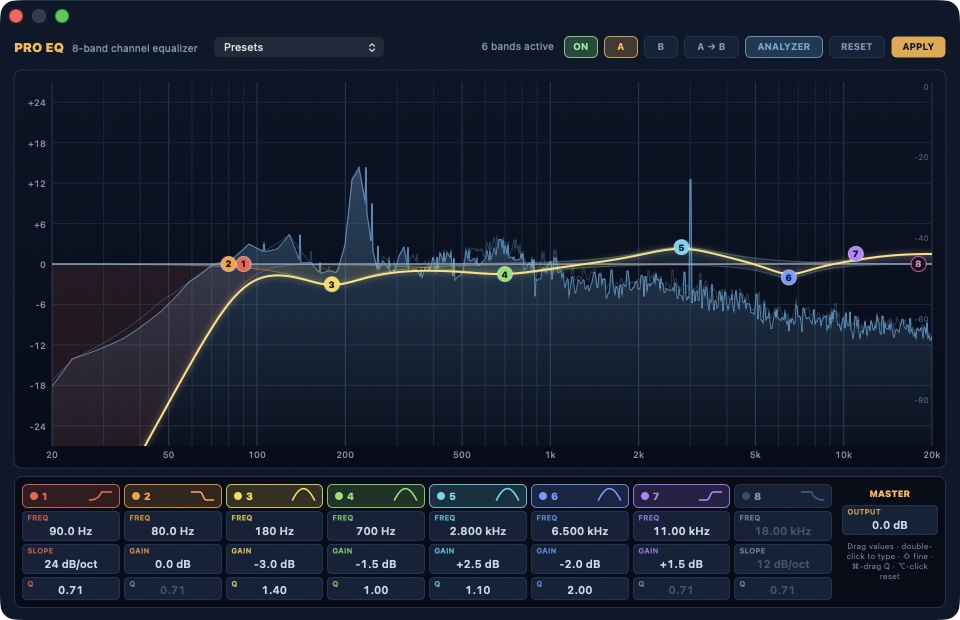
The equalizer is an eight-band channel strip: a high-pass and a low-pass with slopes from 12 to 48 dB per octave and adjustable resonance, a low shelf, four bells with Q from 0.1 to 24, a high shelf, and an output trim. The curve you see is not a drawing. Every time you move a band, PeakLab pushes an impulse through the actual filters and measures the response, so the line on screen is the response you get, to the fraction of a decibel. Behind it runs a 4096-point spectrum analyzer with a peak trace, calibrated so a full-scale sine reads 0 dBFS.
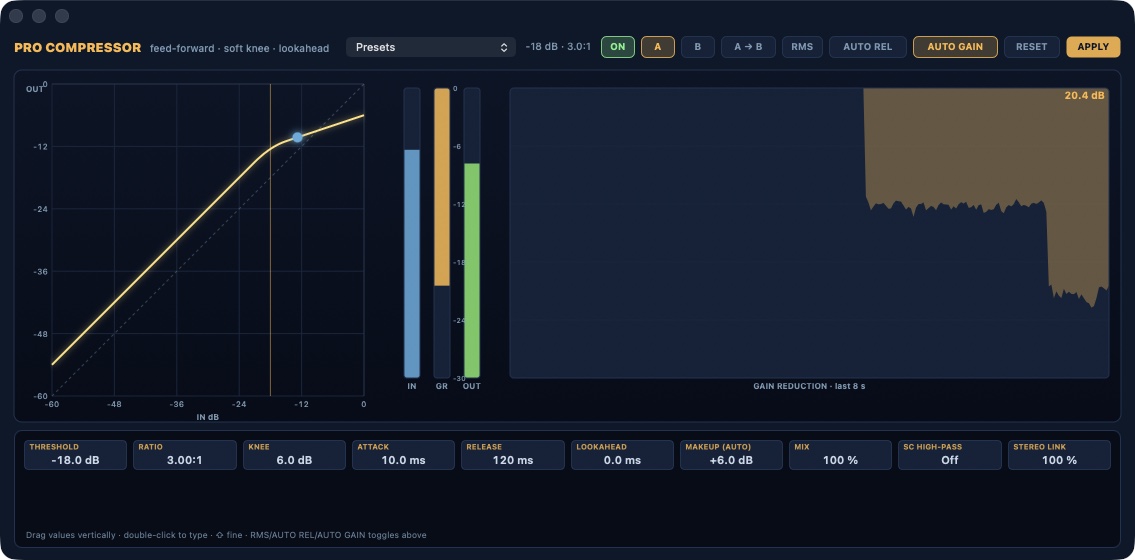
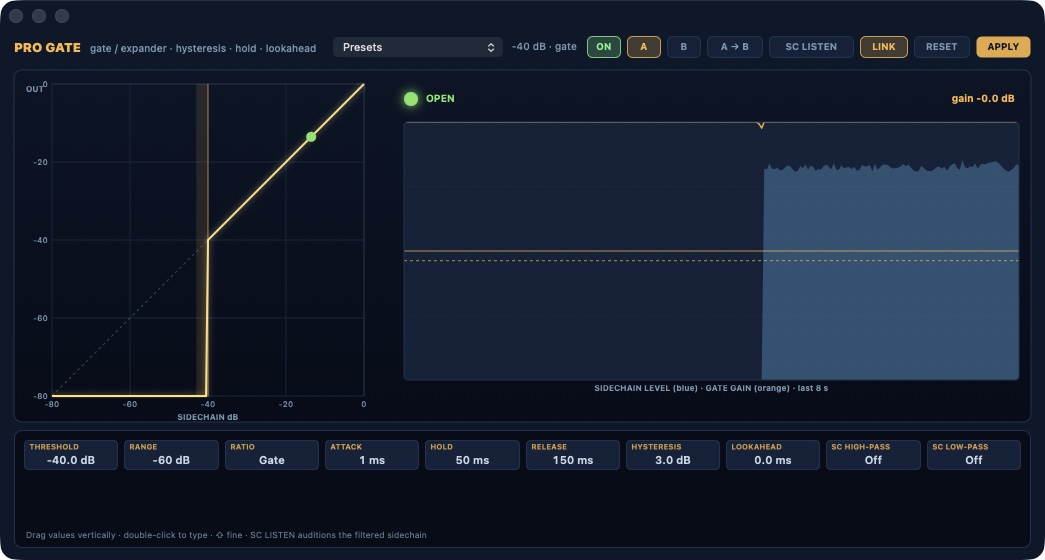
The compressor, the gate and the reverb are PeakLab's own signal processing, hosted in audio units the app registers for itself, which means the exact same code runs while you listen and when you render. The compressor is feed-forward with a soft knee, peak or RMS detection, up to 10 ms of lookahead with the latency compensated on export, program-dependent release, automatic or manual makeup, a mix control for parallel compression, a high-pass on the sidechain and a stereo link. The gate is a downward expander that becomes a hard gate at the top of its ratio, with range, hysteresis, hold, lookahead, high-pass and low-pass filters on the sidechain, and a listen button to hear what the detector hears.
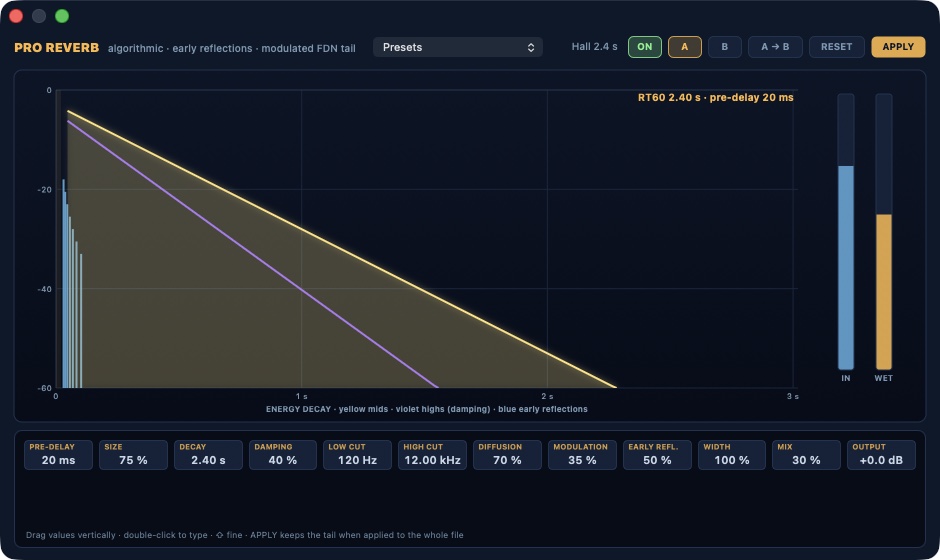
The reverb is an algorithmic design: a pre-delay line that also feeds early reflections, four diffusers per channel, and an eight-line feedback network with Hadamard mixing, modulated delays and per-line damping. Decay runs from 0.2 to 20 seconds and measures within three percent of the value on the dial. Size, damping, low and high cut, diffusion, modulation, early reflections level, width and mix are all in the open, and the whole thing costs well under one percent of a core.
The four quick buttons stayed, and they matter more now: TONE, VERB, COMP and GATE load complete parameter sets into these engines. A preset is a starting point. An Option-click opens the Pro window with that preset already loaded, and from there every value is yours to drag, type or compare with A and B. Applying any effect writes it into the file, or into the selection, as a single step you can undo.
Underneath, the editing core went through a full review. Every edit is one reversible transaction, so undo and redo hold together across cuts, pastes, punch-ins and effects. Saving keeps the file's own format, so a FLAC stays FLAC and Apple Lossless stays lossless, while formats that cannot be written in place, like MP3, go through Save As. A recording is committed before the window can close, at any sample rate, converted to the document's rate on the way in. Markers follow edits. Playback survives a device change. Small things, all of them, and they are the difference between an editor you try and an editor you trust.
03
My approach
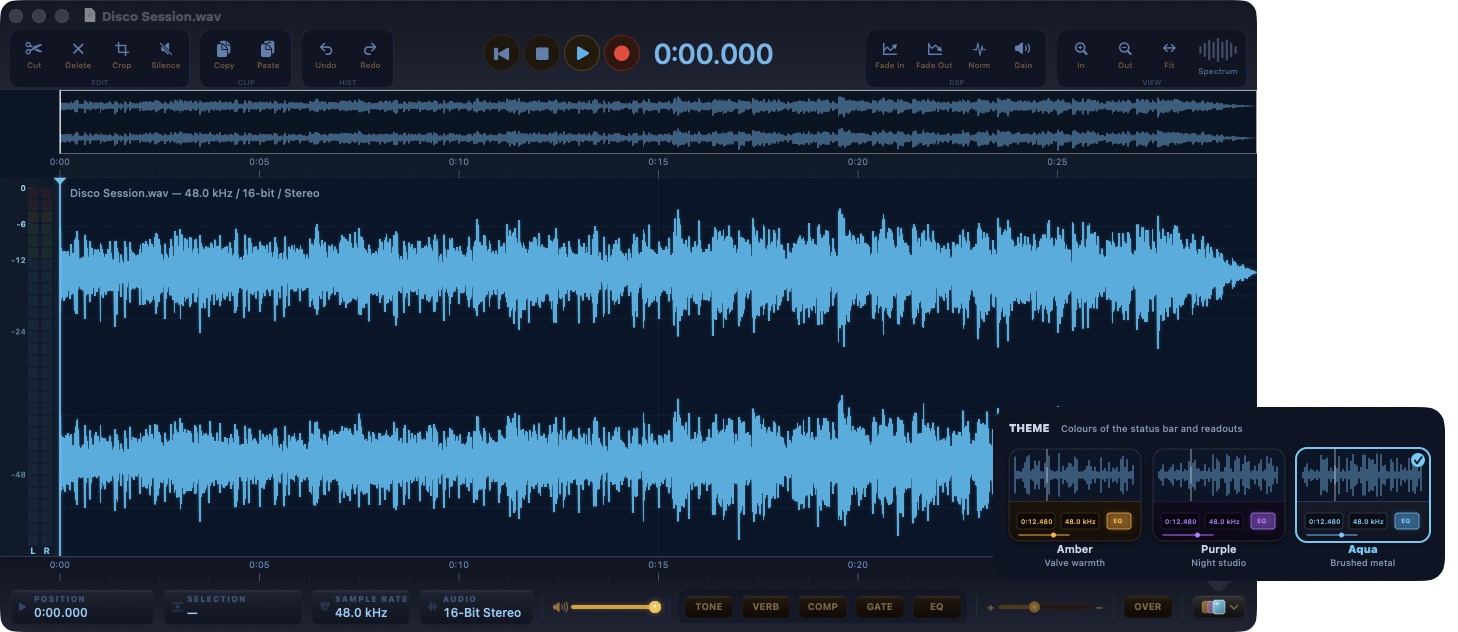
PeakLab is free. You download it, you open it, you work. It opens a file and shows you the waveform, at any scale, with the overview strip on top and the transport, the readouts and the effects rack on the bottom bar. Selections are sample-accurate; cuts, pastes, trims, fades, crossfades, gain, normalization by peak or by LUFS, inversion, reversal, time stretch and pitch shift, spectral noise reduction and a spectrogram view are all a click or a shortcut away, and each of them is one undoable step.
Pro EQ
Eight bands on a measured response curve with the analyzer behind it. Drag a handle for frequency and gain, hold Command or use the wheel for Q, double-click to switch a band off, Option-click to reset it, right-click for its shape and slope. The strip below shows every value and lets you type it. Factory presets, your own presets, A/B with copy, a true bypass and Apply.
Pro Compressor
The transfer curve with the live operating point, input, gain-reduction and output meters, and eight seconds of gain-reduction history. Threshold, ratio up to a brickwall limiter, knee, attack, release with an automatic mode, peak or RMS, lookahead, makeup with an automatic mode, mix, sidechain high-pass and stereo link.
Pro Gate
The static curve with the hysteresis band, an open and closed lamp, and a strip that plots the sidechain level in blue against the gate's gain in orange. Threshold, range down to full mute, ratio from gentle expansion to a hard gate, attack, hold, release, hysteresis, lookahead, sidechain filters and sidechain listen.
Pro Reverb
The energy decay picture shows pre-delay, early reflections, the mid-band tail and the damped high band, with input and wet meters at the side. Ten presets from a tight room to a cathedral, plus your own. Applied to the whole file, the reverb keeps its tail.
Recording, voice-over and batch
Record into a new document or punch in over a selection, from any input device; the take is converted to the document's rate and committed as one edit. A voice-over track can be recorded and mixed over the material. Batch processing runs the same effects over a folder, writing to a destination of your choice with a list of anything that failed.
Files
WAV, AIFF, FLAC, Apple Lossless, AAC and CAF are written in place; MP3, Ogg and everything else the Mac can decode are opened and saved as one of those. Export renders through the same effects chain you are listening to, at the bit depth you pick.
Themes and updates
Three palettes, Amber, Purple and Aqua, chosen from a gallery of live miniatures; Aqua is the default. Updates arrive through a signed channel: the manifest is verified with Ed25519 and the download with SHA-256 before anything is opened, and the download button on this page reads that same channel.
PeakLab 3.2 is free, notarized by Apple and built for Apple silicon. It needs macOS 13 Ventura or later. It runs in the App Sandbox, has no account, no subscription and no telemetry. It is developed by an Italian crew from Portomaggiore.
More from the codex
Discussion 0 comments
No comments yet. Start the conversation.