
Once upon a time, EasyTime. Meet StackTime.
An agenda, an almanac, a place for your documents and ideas. Made for Mac, in Portomaggiore.
39.90 EUR · Up to 3 Macs · one-time purchase
Buy StackTimeDownload after payment. Code and link also sent by email. No automatic renewal.
App in Italian, English and German · IT / EN / DE · macOS 14+
01
Your time, and everything in it
Once upon a time, there was EasyTime. If you used a Mac in the early 2000s, you may remember that idea of an agenda: open a day and find room to read, write and organise. A place where appointments had space and related information stayed close.
That memory was our starting point. What would an agenda built with the same desire to be useful look like today, with documents, synchronisation, visual connections and an optional AI assistant? Our answer is StackTime, developed by an Italian crew in Portomaggiore, in the province of Ferrara.
EasyTime was a SoftLab product: a November 2005 announcement from distributor Alias preserves a piece of its history. StackTime is our new, independent project: a native Mac app that starts with your agenda and makes room for the things that actually fill a day.
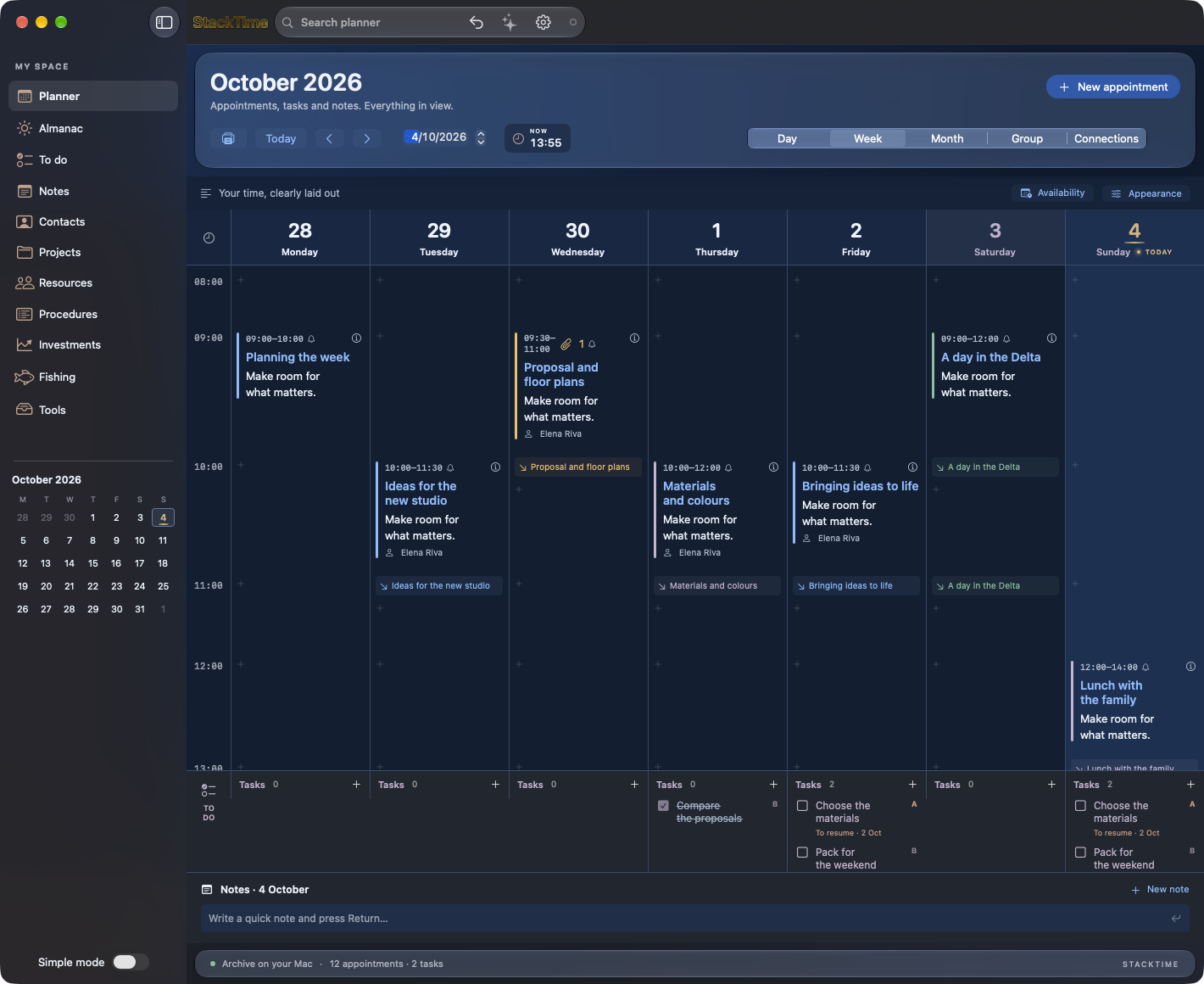
A week you can read
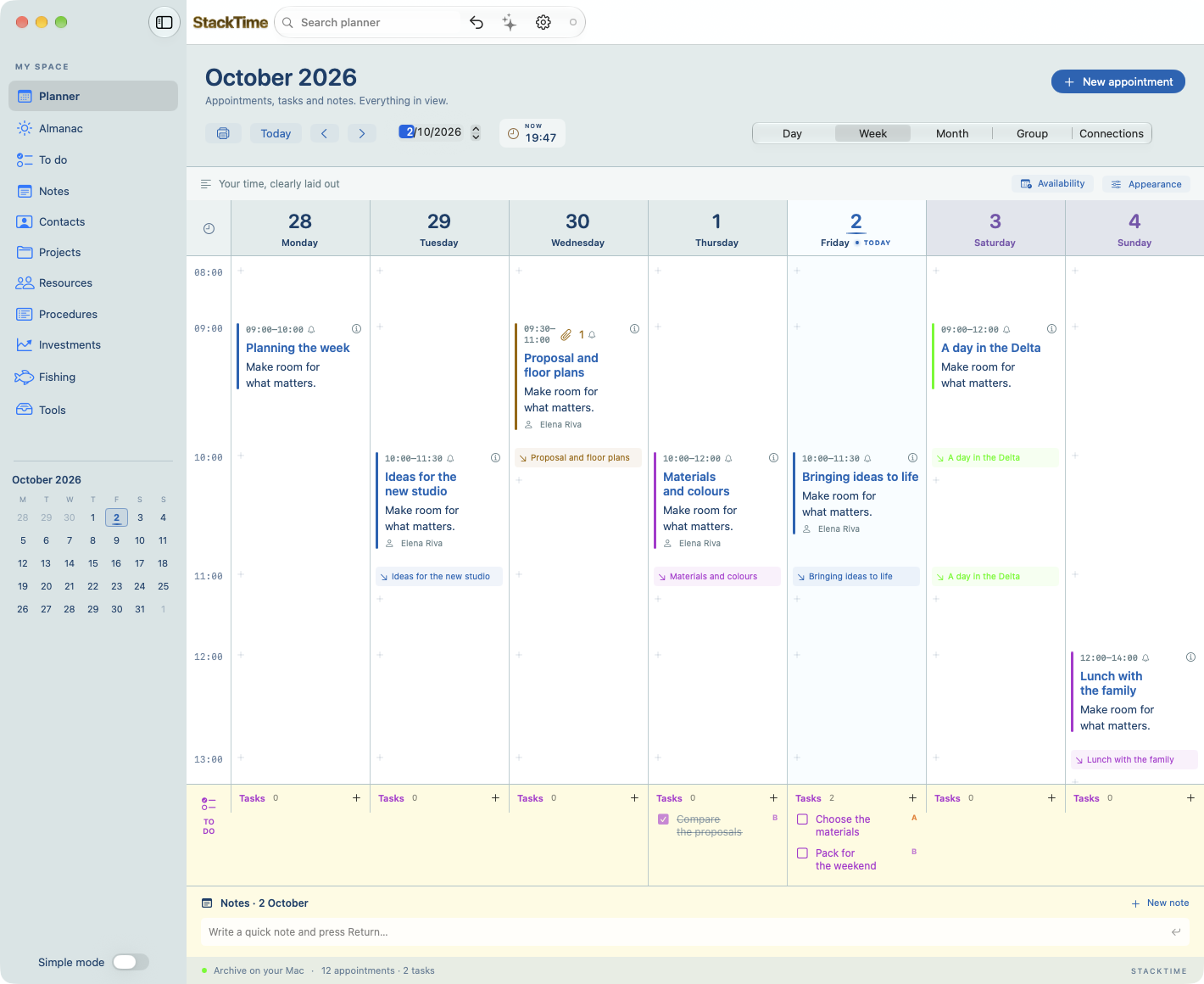
Day, week and month views offer different perspectives on the same archive. The week includes all seven days, Saturday and Sunday too. Titles, times, colours, notes and tasks help you understand what needs doing without making every appointment a tiny placeholder to decipher.
Create and edit appointments, set recurring events, add notes and use the right-click menu for common actions. A live clock in the agenda toolbar keeps the present in view. Reminders combine macOS notifications with visible, audible alerts inside the app and an option to snooze. Enable StackTime notifications in your Mac’s settings to receive them.
Simple mode when you want focus; full mode when you need more. Start with the agenda and open the specialised sections when they become useful.
Keep the document with its day
A house proposal arrives. Someone plays a track you want to remember. You receive a quotation or a photograph during a meeting. Drag the file onto a day and time in the agenda, add a description and keep the context.
StackTime supports PDFs, images, MP3, AAC and other documents as appointment attachments. It copies them into its own archive, marks them with a dedicated amber accent and lets you preview them or save a copy from the context menu. The file stays with the reason you kept it. Attachments also sync across your paired Macs.
Make the relationships visible
The Connections view adds a node map alongside the calendar grid. A project can bring together appointments, people, tasks and notes: select an item, follow its connections, explore deeper levels, zoom in and centre what matters. Animations accompany the move from one relationship to another.
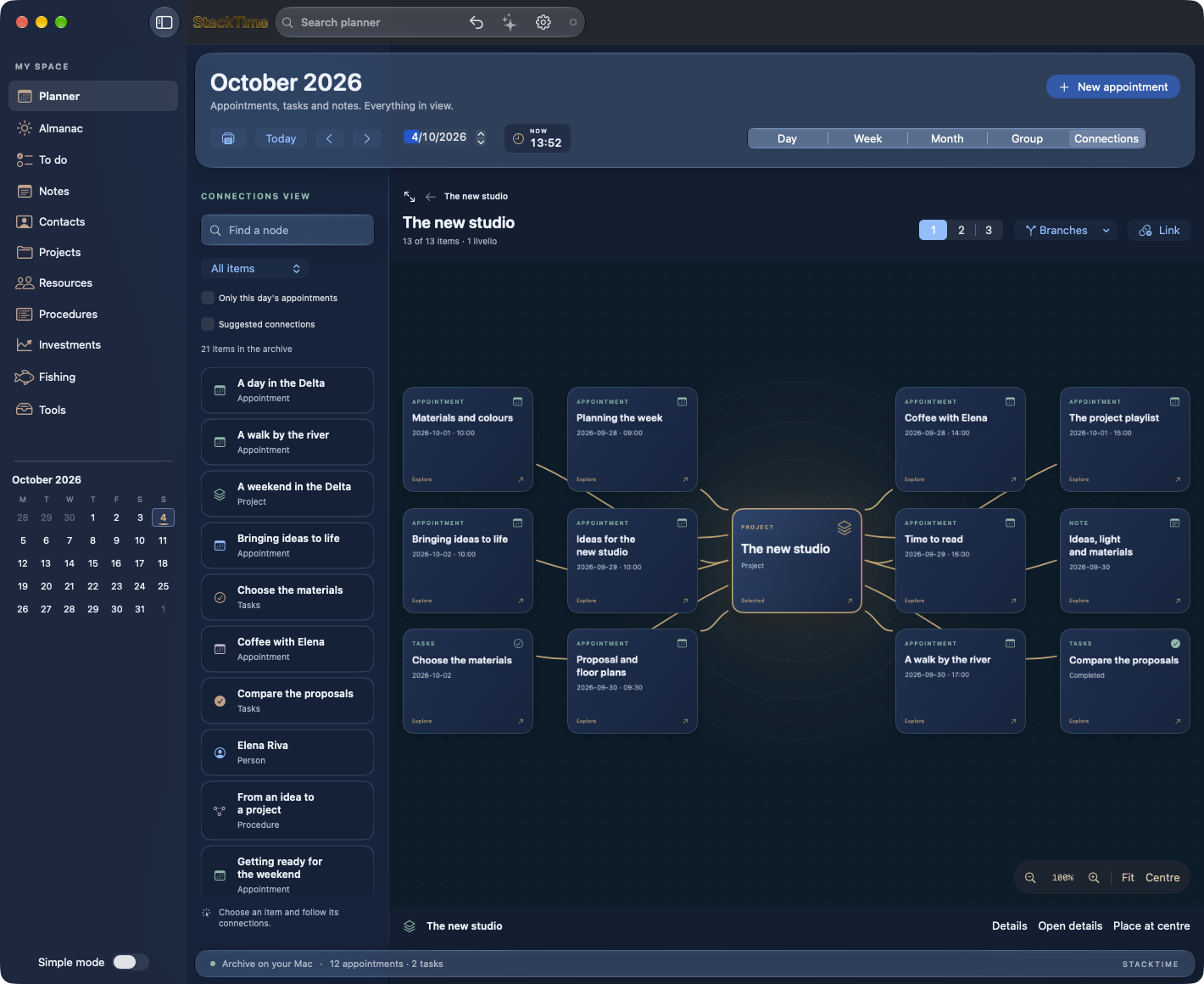
Procedures preserve reusable methods, with steps and dependencies that can also be explored as a node map. Projects, contacts and resources complete the same workspace. A method that works can become the starting point for your next project.
02
There is more to a day
An almanac worth opening on a free day
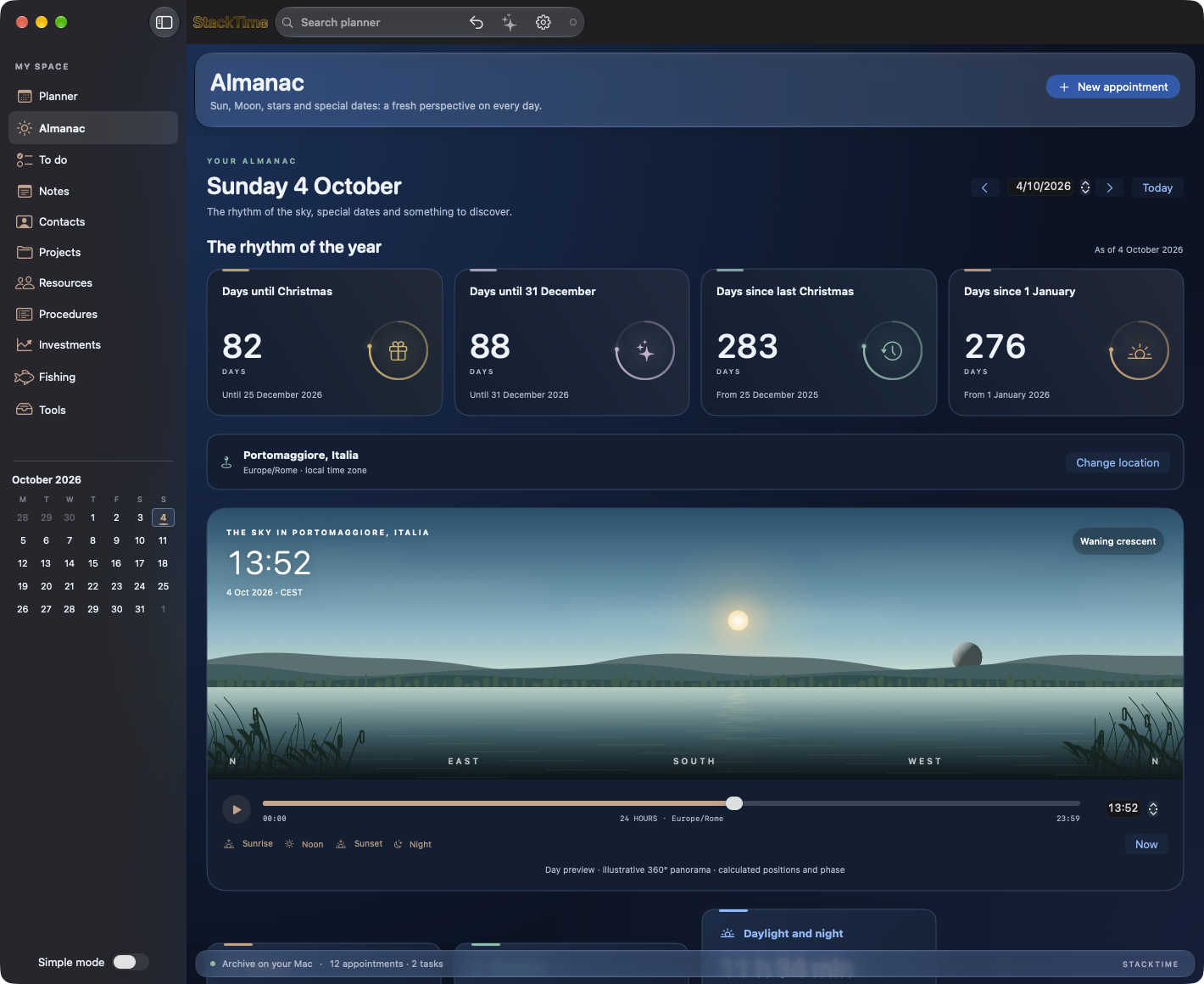
Sometimes you simply want to know when the Sun sets, how much daylight is left or what phase the Moon is in. The almanac brings together holidays, notable dates and daily curiosities, sunrise and sunset, moonrise and moonset, and hours of light and darkness.
Choose a location, including by entering a town and country. A panorama follows the transition from day to night; the sky view places the main constellations according to the location and time, with Polaris and the Big Dipper in gold. Equinoxes, solstices and seasons explain why days grow longer and shorter. Astronomical events also include eclipses and available visibility information.
There is room for the rhythm of the year: days until Christmas and 31 December, days since last Christmas and New Year’s Day. Numbers become small animations in an interface designed to be enjoyable to explore.
Time for your interests
The Fishing section brings together trips, catches, techniques and places you can find again in Apple Maps or Google Maps. An animated panorama, time slider, Sun position and Moon phase help you prepare for a trip. Marine conditions and tides, where available for your chosen location, provide additional context, without promising guaranteed catches.
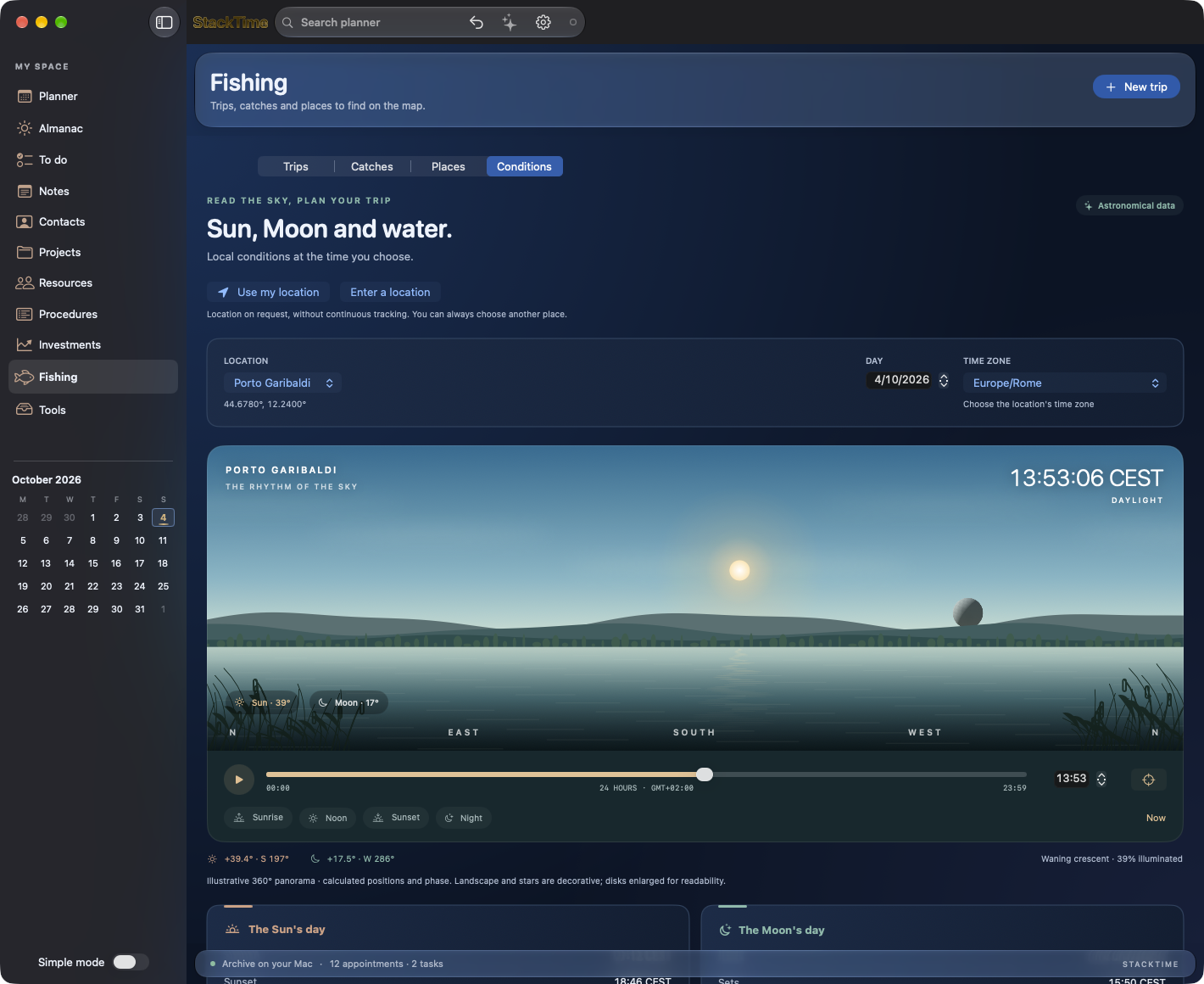
The Investments section lets you follow stocks and cryptocurrencies entered in your archive, check quotes through Yahoo Finance and organise ex-dividend dates, dividend payment dates and airdrop deadlines. Quotes depend on the data provider and may be delayed: this is a place to organise information and dates, not a trading platform.
Notes, tasks, contacts, projects and work tools share the same environment. Move from work commitments to your own time while keeping the thread of your day.
03
Your agenda, ready to follow you
The same agenda across your Macs
In Settings, a pairing code connects your other Macs to your sync workspace. Appointments, notes and other archive items merge with what is already there: connecting a new Mac does not blindly replace the agenda on the others. The server coordinates updates and the app’s toolbar shows connection status.
Your archive is also stored on your Mac. Keep working offline and sync when you reconnect; backup and restore tools are available, including a full backup with downloaded attachments. This release is for macOS: your purchase covers the Mac app and synchronisation across Macs.
Optional AI, with the provider you choose
Connect OpenAI, Anthropic Claude or DeepSeek by entering your own API key in Settings. The assistant can help you summarise commitments, identify priorities and prepare proposed appointments and tasks. Proposals are added to the agenda only after you confirm them.
Keys are stored in the macOS Keychain. AI is optional: the agenda works without it. Your provider’s API key and any usage charges are separate from the price of StackTime.
Two styles, one agenda: Classic and Glass
Glass brings deep blue, translucent surfaces and luminous accents to StackTime. Classic offers a light background and the colours of a traditional diary. Choose your appearance in Settings: your appointments, documents and features stay the same. Available Glass effects depend on your macOS version and accessibility settings.
Three languages. Made for Mac.
StackTime is available in Italian, English and German — IT / EN / DE and follows your Mac’s language. Choose the classic appearance or the Liquid Glass theme, with the effects supported by your version of macOS. The app is signed and notarised, runs on Apple Silicon and Intel, and requires macOS 14 or later.
Check for updates inside the app, with signature and download verification. Enable automatic update checks to find out when a new version is available.
€39.90 once, for up to 3 Macs
One purchase, a license with no expiry, no subscription and no automatic renewal. Your code activates StackTime on up to three Macs.
- Select Buy StackTime and complete secure payment with Stripe.
- After payment is confirmed, the page displays the app download button. Your activation code and download link are also sent by email.
- Open the DMG, drag StackTime into Applications and enter your code in the License panel in Settings.
An internet connection is required for activation and periodic license checks; a successful check allows up to 30 days of offline use. Sync, quotes and AI need a connection to update.
Built in Portomaggiore. Made to give your days more room.
Make room for your days.
macOS 14+ · Apple Silicon & Intel · Italian, English, German (IT / EN / DE)
39.90 EUR · Up to 3 Macs · one-time purchase
Buy StackTimeDownload after payment. Code and link also sent by email. No automatic renewal.
More from the codex
Discussion 0 comments
No comments yet. Start the conversation.