
Charlie: Turning the Mac into a Cockpit for Coding Agents
A native Apple-silicon workspace bringing a Metal terminal, Codex, Claude, Git, reviews, approvals, tasks and SSH into one place.
29.90 EUR · Up to 2 Macs · one-time purchase
Buy CharlieDownload after payment. Code and link also sent by email. No automatic renewal.
Apple silicon Mac · macOS 15 or later · Italian and English. AI services require their own accounts or credits, which are not included in the Charlie license.
Inside the app
See how working with Charlie looks.
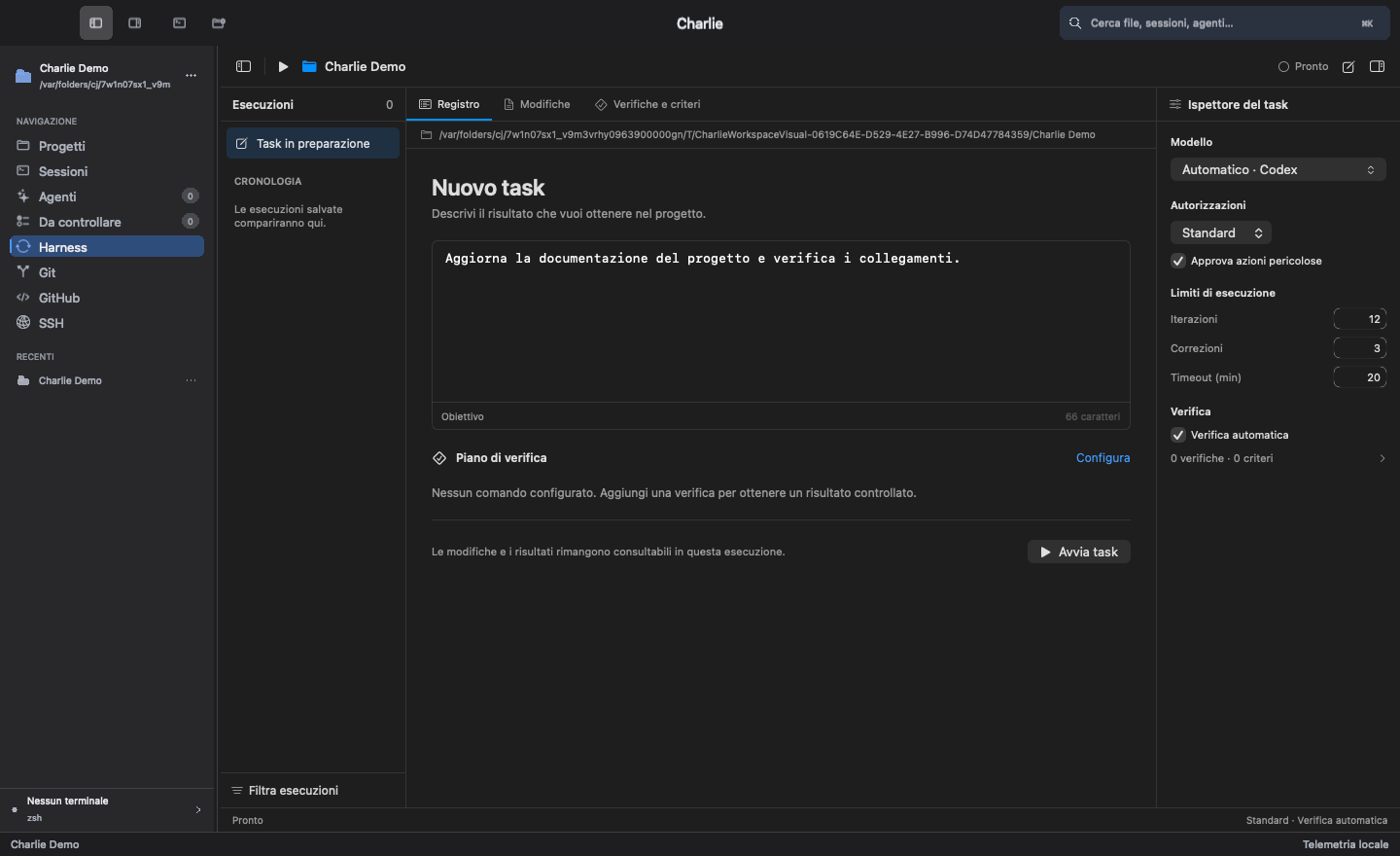
Actual app screenshots. Click any image to enlarge. Sample projects and conversations, no customer data.
Screenshots show the Italian interface. Charlie is also available in English.
A conversation with project context
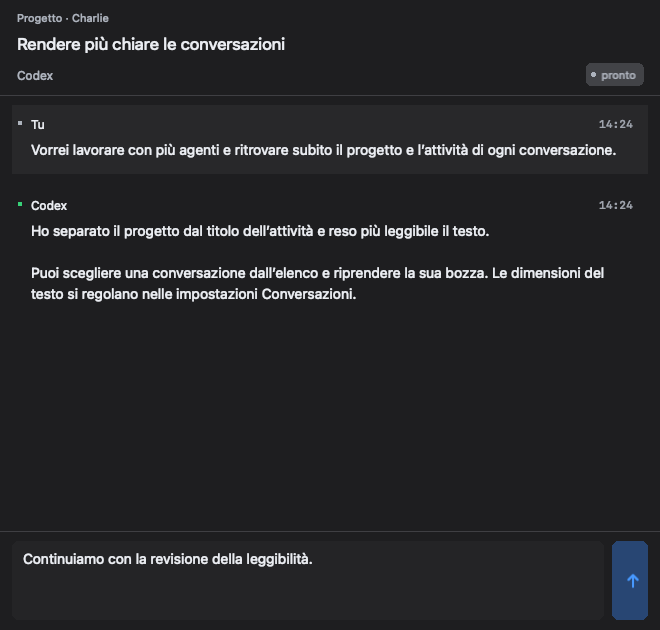
Project context, your request, the agent’s reply and your next message in one panel. Interface detail with a sample conversation.
From GitHub to working with agents
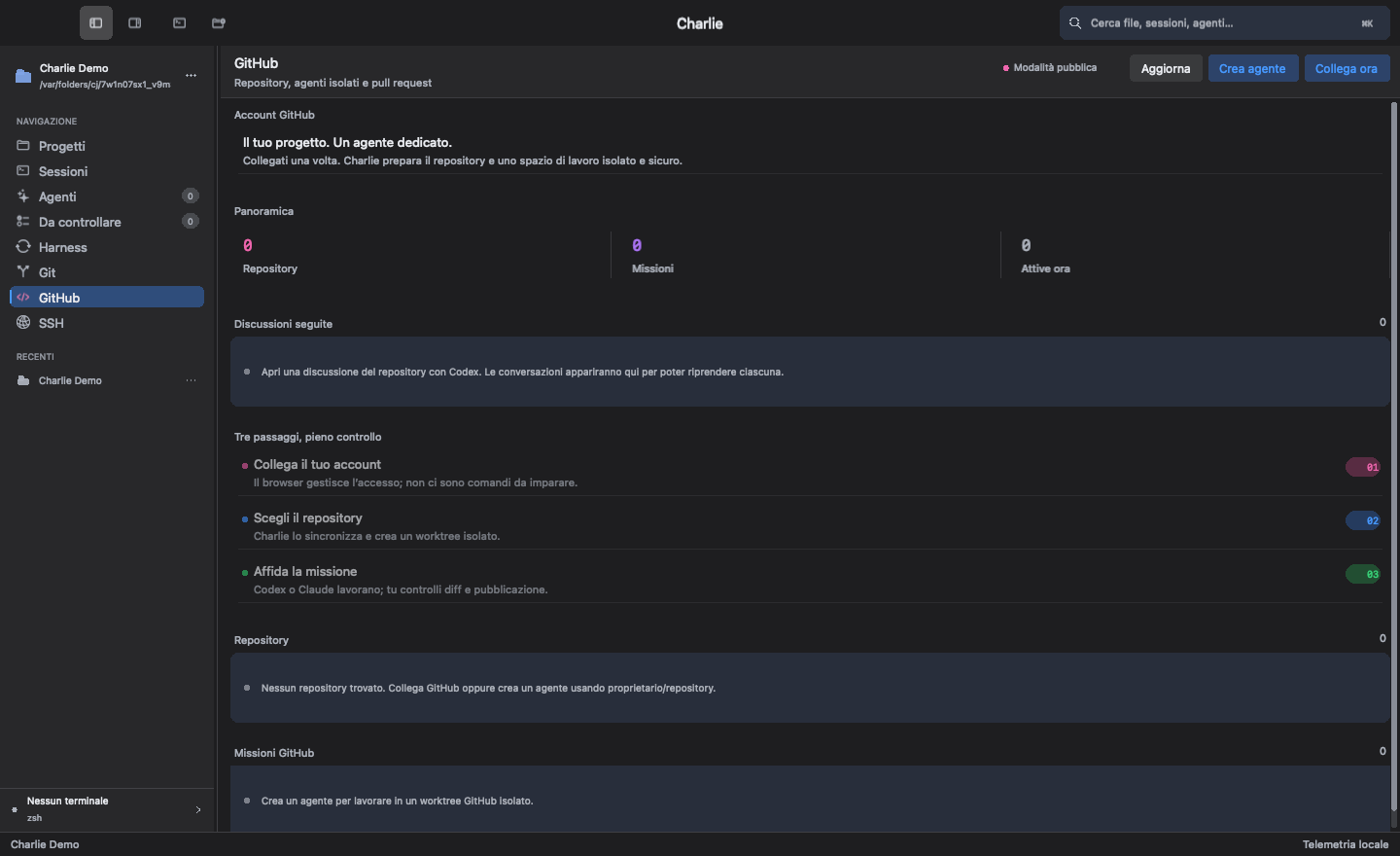
The initial screen guides account connection, repository selection and starting a mission. Shown here before connecting an account.
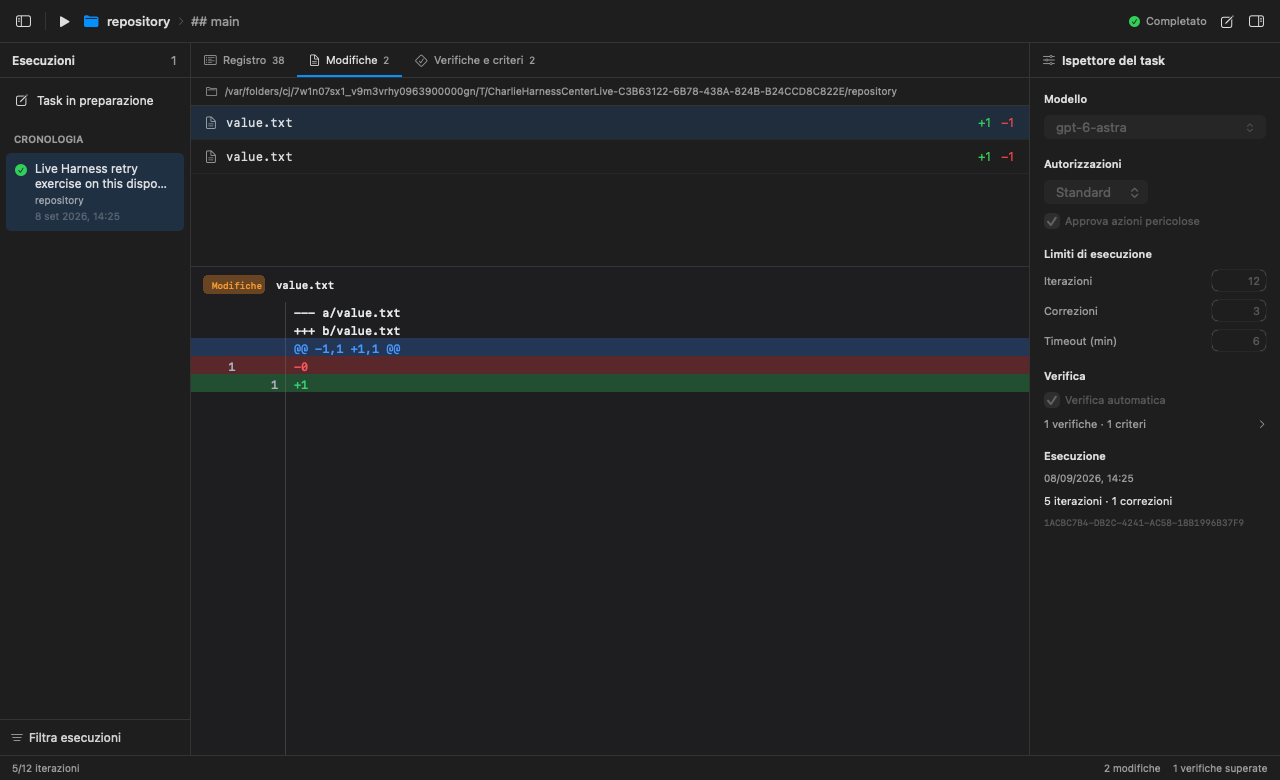
See exactly what changed
The Changes panel shows files and line-by-line differences. This screenshot comes from a Harness test run on a small repository.
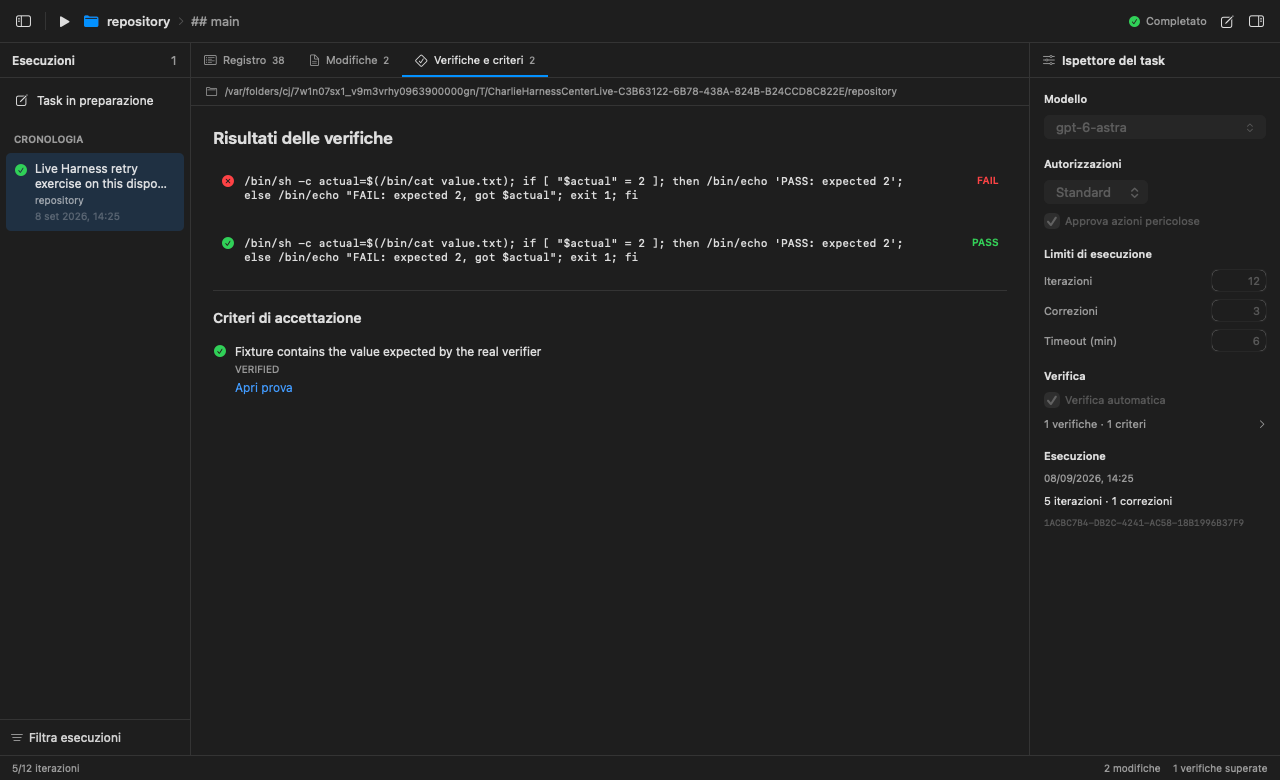
A result you can verify
A failed check, a correction, then a passing check: the record keeps the outcomes and acceptance criteria. Screenshot from the same test run.
01
The problem
Software development no longer lives in a single window. A normal session can involve a terminal, an editor, an AI conversation, a Git client, a task list and several approval prompts. Each tool may be good on its own, yet the workflow becomes fragmented precisely when the work gets more complex.
With more than one coding agent running, even basic questions become surprisingly difficult: Which agent is working? In which directory? Under which process and PID? What commands did it run, what changed in Git, and what still needs approval? A terminal can show the output, but output alone is not the same as understanding the state of the work.
Charlie starts from that gap. It is not simply a chat panel attached to a shell. It is a native Mac workspace built to turn agent activity into visible, inspectable and controllable local state.
02
Why it happens on macOS
Traditional terminal emulators are exceptionally good at streaming characters, while IDEs are built around files and a developer who remains in direct control of every step. Coding agents cross that boundary. They launch processes, inspect repositories, edit many files, wait for permissions and sometimes work in parallel.
If an application only embeds an agent CLI inside a tab, it loses most of that meaning. Charlie instead uses the structured protocols exposed by Codex App Server and Claude Code. Tool calls, approvals, progress and completion are represented as events rather than guessed by scraping coloured text. The provider layer is deliberately open so that other models can be added without rebuilding the workspace around a single vendor.
The same focus applies to the platform. Charlie targets Apple-silicon Macs and macOS 15 or later. Its terminal is based on Ghostty's embedding core and a Metal rendering path, while the surrounding workspace is designed as a fast, persistent native interface. This narrower target lets the product optimise for the machines it actually intends to serve.
03
My approach
Charlie 2.1.0 · one-time license
Charlie is available for €29.90 as a one-time purchase for up to 2 Macs, with no subscription or automatic renewal. After payment confirmation, you receive the license code and download link by email; the download is also available on the confirmation page. Enter the code when you open Charlie. You can deactivate a Mac from Charlie → License to free an activation.
The app checks the license periodically and supports up to 30 days offline after a successful verification. Existing signed update notifications remain available. Requires Apple silicon and macOS 15 or later; the interface is in Italian and English. AI provider accounts, subscriptions and usage credits are separate and are not included in the Charlie price.
Charlie brings the daily development loop into one coherent workspace:
A first-class terminal: Metal rendering, dependable TUI behaviour, splits, tabs, search, line numbers and crash recovery.
Agents as visible processes: Codex and Claude sessions show their provider, task, working directory, process, PID, commands, results and approval state.
Git without hidden context: diffs, review, approvals and isolated worktrees make parallel agent work easier to understand and safer to merge.
The tools around the terminal: an integrated editor, project tasks, SSH hosts, connection diagnostics and local resource monitoring stay close to the work.
Local-first operation: workspace state, event history and telemetry remain on the Mac; Charlie does not rely on remote product telemetry to explain what happened.
Reliability is part of the product, not a final coat of paint. The app includes orderly agent shutdown, recovery of interrupted sessions, guarded approval flows, a signed update channel and a growing suite of more than 160 automated tests covering PTYs, provider transports, Git workflows and recovery paths.
What is new in Charlie 1.6.0 (build 7)
Charlie 1.6.0 adds a new integrated GitHub section. The GitHub CLI for Apple silicon ships inside the app, so no Homebrew installation is needed. Linking your GitHub account is simpler: the flow opens in the browser and the code is copied automatically. From there you can search and pick your public and private repositories.
On top of a repository you create GitHub missions for Codex or Claude from a custom prompt, either in read-only review mode or in implementation mode. Each mission works in an isolated Git worktree, so the main repository stays protected. Pull requests are published only after a Git status check and a human confirmation. Active missions are listed and monitored, and GitHub processes are cancelled safely when you switch workspace or quit Charlie. Stale results are discarded when you jump between projects quickly.
Mandatory updates are now enforced and can no longer be deferred by accident. Login, shutdown and background processes are more stable.
Charlie 1.8.1. Charlie 1.8.1 brings more control over projects and more clarity when working with agents. This release strengthens the heart of Charlie: running several agents on the Mac, following different discussions and keeping project, code and results connected.
Conversations are more numerous and better organised: separate discussions, a browsable history and saved drafts, so you can switch between tasks and pick up work with its context. Every project has its own workspace, with its own terminals and its own selection, and moving between different jobs stays tidy.
Agents run in parallel with stronger isolation: tasks that change code can work in separate Git folders, with protections against concurrent writes to the same folder. GitHub becomes part of the daily flow: repositories, discussions and pull requests are linked to the agents' tasks, with results and checks you can review. Tasks that need attention become visible: approvals, errors and work to verify are gathered in one dedicated place, so you can follow several agents with fewer steps.
Conversations are easier to read and text is more comfortable to work with: project, task, author and status have a clear hierarchy, and copying, selection, draft handling and undo of text edits have all improved. The interface is cleaner and adaptive, with more legible titles, quieter colours, adjustable density and controls that adapt to narrow spaces. Settings are finally more direct: clear groups, explicit values and font previews for terminal, editor and conversations, with chat text adjustable from 12 to 20 points.
Charlie 2.0.1. Charlie 2.0.1 introduces the Harness workspace, which runs AI tasks through a complete cycle of project analysis, tool execution, file changes, verification, and correction. When a check fails, its actual errors go back to the model so it can correct its changes and try again, and every run keeps its evidence: live activity, file diffs, verification results, and acceptance criteria.
The Mac interface has been refined with an Xcode-inspired layout, clearer navigation, improved hierarchy, and more consistent controls, and Harness runs now appear in global search, task filters, activity counters, and notifications. Conversations follow incoming responses and tool activity automatically, with a "New updates" button when you are reading earlier messages.
Markdown files open directly inside Charlie with corrected document switching and saving, sidebar sections respond immediately on mouse press, and GitHub task setup now shows field-specific validation messages that preserve your input when corrections are needed. Under the hood, this release strengthens cancellation, workspace protection, context management, and verification integrity. Existing automatic update notifications remain supported.
Charlie 2.0.5. Charlie 2.0.5 fixes general bugs. In particular, Charlie no longer quits unexpectedly when a program launched from its terminal crashes: the release build now keeps the callback needed to handle child-process exceptions, a packaging check refuses any binary that lacks it, and a regression test covers a real child-process crash. Harness, agents, the GitHub integration and the automatic update checks work as before.
Version 2.1.0 is the current public release: a signed and Apple-notarized DMG for Apple silicon, distributed directly by Black Order. Charlie is developed by a crew from Portomaggiore, with a simple ambition: make serious agent-assisted development feel clear, fast and native on the Mac.
Get Charlie 2.1.0 · €29.90 once, for 2 Macs
Requires macOS 15 or later and an Apple-silicon Mac
29.90 EUR · Up to 2 Macs · one-time purchase
Buy CharlieDownload after payment. Code and link also sent by email. No automatic renewal.
More from the codex
Discussion 0 comments
No comments yet. Start the conversation.