Back to Blog

ApexSDR DMR: One Click to Digital Voice. No Pipes, No Pain.

The first SDR with fully integrated digital voice decoding, built native for macOS. By a ham, for hams.

If you have ever tried to decode DMR on your computer, you know the drill.

First you need an SDR application. SDR++, SDR#, GQRX, pick your flavor. Then you need a virtual audio cable to pipe the discriminator output somewhere. Then you need DSDPlus or DSD to actually decode the digital stream. Three separate applications. Configured independently. Connected by virtual plumbing that breaks every time something updates.

Half the posts on ham radio forums are variations of the same question: "I cannot get DSD to work with my SDR, please help." The other half are answers that start with "make sure your virtual audio cable is set to..."

And if you are on macOS? The situation is even worse. The serious decoders are Windows-only. Your options are a virtual machine, a Boot Camp partition, or accepting that digital voice monitoring from your Mac simply is not going to happen.

This is not a minor inconvenience. This is a broken workflow that has persisted for over a decade while DMR has become the dominant digital voice mode in amateur radio.
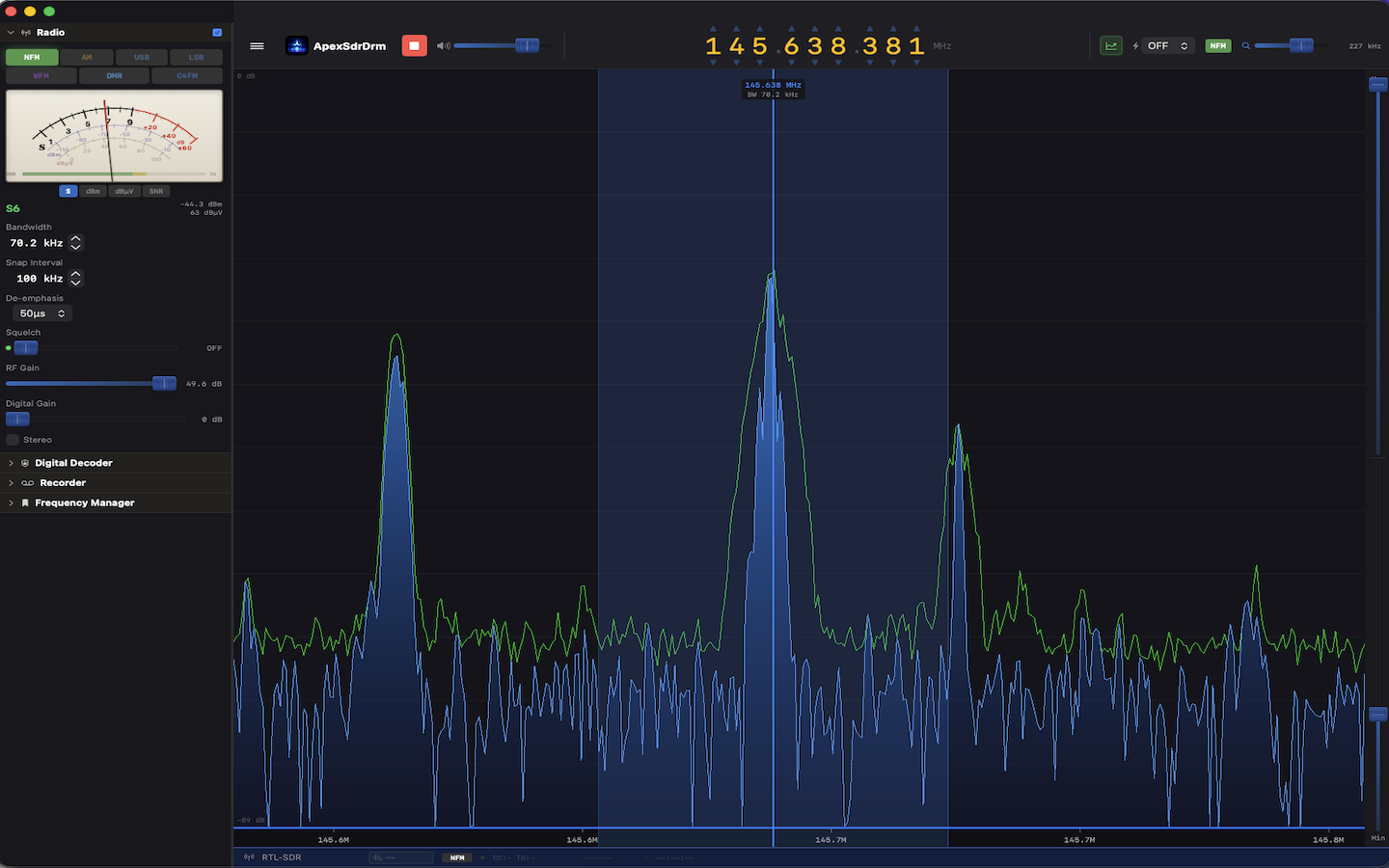
ApexSDR DMR exists because I got tired of fighting software instead of listening to radio.

I am IU4TPI. I have been a licensed radio amateur for years. I build software professionally. And every single time I sat down to monitor my local DMR repeater from my Mac, I ended up troubleshooting audio pipes instead of copying callsigns. That is not the hobby I signed up for.

So I built what should have existed years ago: an SDR application with digital voice decoding built directly into the signal chain. Not bolted on. Not piped through. Built in.

You will notice something missing from ApexSDR DMR: the waterfall display. That scrolling cascade of color that every SDR puts front and center. It is gone on purpose.

Here is the reasoning. When you are monitoring a DMR repeater on 438.500 MHz, what is the waterfall showing you? A narrow signal appearing and disappearing as people key up. You already know the frequency. You already know the bandwidth. The waterfall is telling you nothing you do not already know. It is eye candy that consumes screen space and processing cycles while adding zero operational value for digital voice monitoring.

ApexSDR DMR shows you what matters: signal level, squelch state, mode, timeslot, color code, talkgroup, source callsign. Information you can act on. Not pixels you stare at.

This is a deliberate design choice, not a missing feature. ApexSDR DMR is a radio, not a spectrum painting application.

The experience is exactly what you would expect from a radio.

Select DMR mode. Tune to your repeater frequency. When a transmission comes in, you hear clear voice. On screen you see the timeslot, color code, talkgroup ID, and source callsign. With an active internet connection, ApexSDR DMR automatically resolves DMR IDs against the global database, displaying the operator's callsign and name in real time. You see who is talking, not just a number. No setup. No configuration wizard. No external software. It just works.

The same applies to C4FM. Select the mode. Tune. Listen. Yaesu System Fusion frames are decoded natively with source and destination information displayed in real time.

To be absolutely clear: this decodes amateur radio digital voice. Unencrypted transmissions as used on ham radio repeaters and simplex worldwide, in full compliance with amateur radio regulations. This is a tool for radio amateurs who want to monitor their local repeater without building a Rube Goldberg machine of software components.

ApexSDR DMR is currently in beta on macOS. The core is solid. Analog reception works. DMR decoding works. C4FM decoding works. We are refining the interface, expanding SDR hardware compatibility, and stress-testing across different repeater configurations before the public release on the Mac App Store.

No SDR application on any platform offers integrated one-click DMR and C4FM decoding. Not SDR++. Not SDR#. Not GQRX. Not CubicSDR. None of them. ApexSDR DMR is the first, and it runs native on Apple Silicon.

This is an open development. If you have ideas, feature requests, or suggestions for what ApexSDR DMR should do next, we want to hear from you. Write to info@blackorder.it and help shape the future of this software. The best features come from the operators who use them every day.

73 de IU4TPI.

Beta

ApexSDR DMR is currently in public beta. Download the macOS installer below and try it for free. If you want to stay updated on new versions and developments, drop us a line at info@blackorder.it

Download for macOS

Requires macOS 13 or later

Want to stay updated? Write to info@blackorder.it

ApexSDR DMR: One Click to Digital Voice. No Pipes, No Pain. Preview

Discussion

0 comments 0 total posts

Leave a comment

No comments yet. Be the first!

Share: